
Unity Forma Editor
Product Overview
Forma is a software suite that helps 3d specialist in the automotive and manufacturing industries to turn complex 3D product data into interactive product configurators and more. Users make product variations, create interactive cameras, visualize designs, and export results in a non-coding required interface. Forma launched in December 2020, trusted by industry leaders such as Volkswagen and Airbus.
Contributions
0-1 Product Design: Sole designer, scaling Forma Editor from a concept into a multi-platform 3D authoring suite.
Strategic Discovery & Product-Market Fit: Conducted foundational user studies that led to breakthrough findings, directly resulting in the acquisition of the early adopters.
Operational Leadership: Served as the design key person of the entire manufacturing vertical, established the vertical's data-driven design culture, implementing frameworks for testing and iterative development.
Initial Discovery
Holiday Calls: I was hired right before the holiday season, instead of expecting more context from the team, I used my own connections and set up interviews with industry experts from Nio and Honda Motor in East Asia.
Onsite Studies: Fought for resource to conduct international onsite-studies and brought back user reports and partnerships.
SME Interviews: Ran 50+ rounds of interviews and established a format that devs, sales or anyone on the team are invited so the team grew together and make better autonomous calls.
Journey Mapping
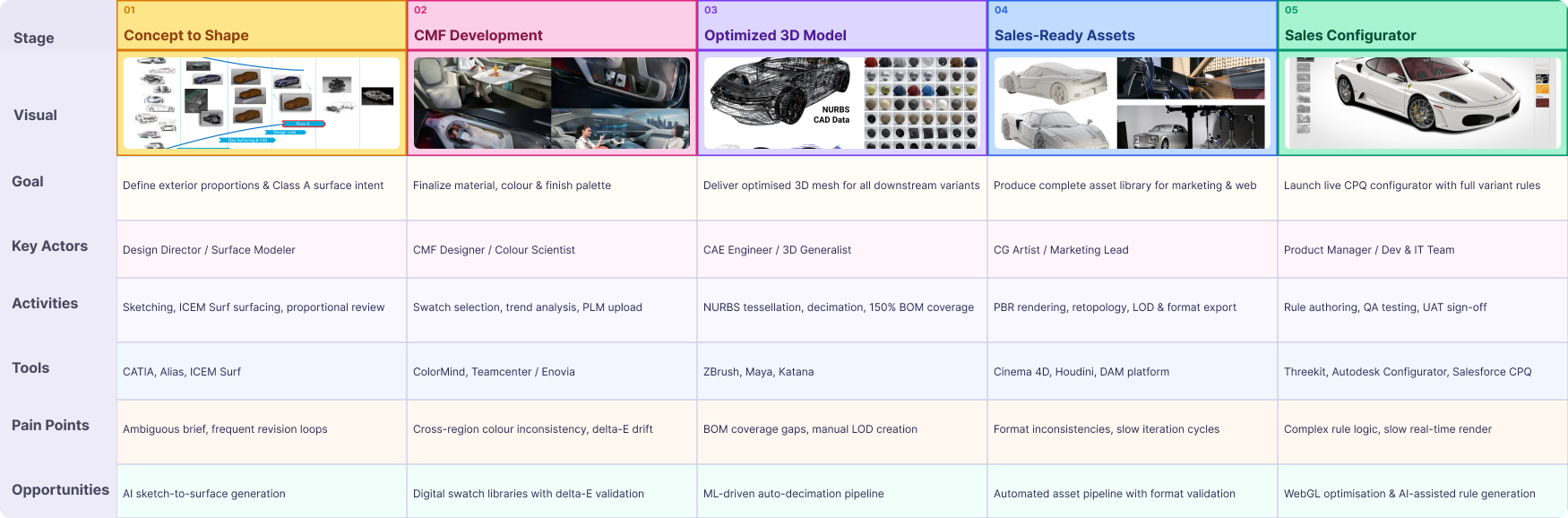
How OEMs use 3D models to create configurators

1.Concept to Shape
To start a new model line, in-house designers create hundreds of sketches, clay, and finally lands a class A surface model that will be the master model for engineering.

2. CMF Development
During the Color, Material, and Feel development phase, more parts and data for interior and exterior design would be added to the car model.

3. Optimized 3D Model
A Manufacture-ready CAD model will be created and outsourced to downstream factories. In the meantime, a digital material library for this model would be created along side the optimized 3D model that has lighter poly counts for sales and marketing platforms.

4. Sales-ready Assets
Associate teams would shoot HDRI in traditional photography or create 3D stages to host the product.

5. Sales Configurator
In-house or third-party collaboration, optimized 3D model, materials, environments, all digital assets will be organized to create the end configurator. Cameras and other interactivity will be added. PM will review configuration options ensure they are true to sales rules. For example, if a user chooses a V8 engineer, a limited edition car paint should be available.
Target Users
Technical Artist
The narrator of 3D experience
Comfortable with 3D tools
Efficiency matters
Projuct Manager
The gatekeeper of model correctness
Uses text-heavy UI like BOM, Excel
Manage sales content
Main Problem
In the Sales Configurator development stage, auto brands rely heavily on expensive manual agency works or slow in-house development for difficult-to-maintain solutions due to the absence of proper tools. High recursive cost result in companies searching for better solutions.
Success Metrics
Instead of “growing X by Y percent” approach, the success metrics of the early stage is simple, as long as we onboard targeted industry leaders, it’s a win, which we completed the milestone soon after release.
Design Process - Overall
Framing
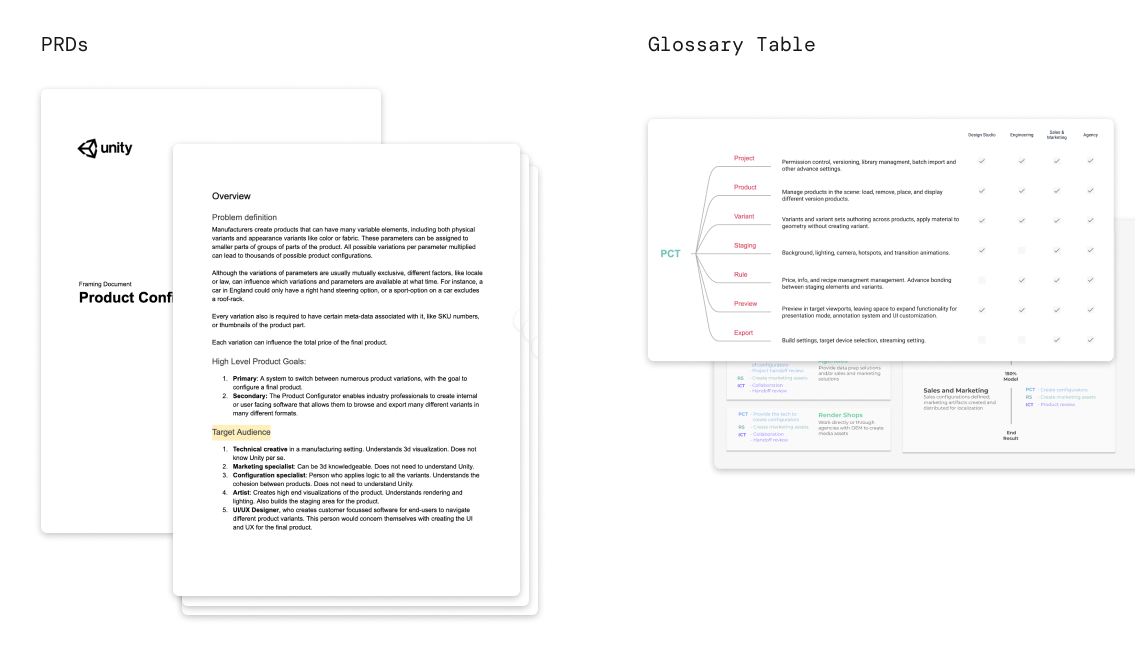
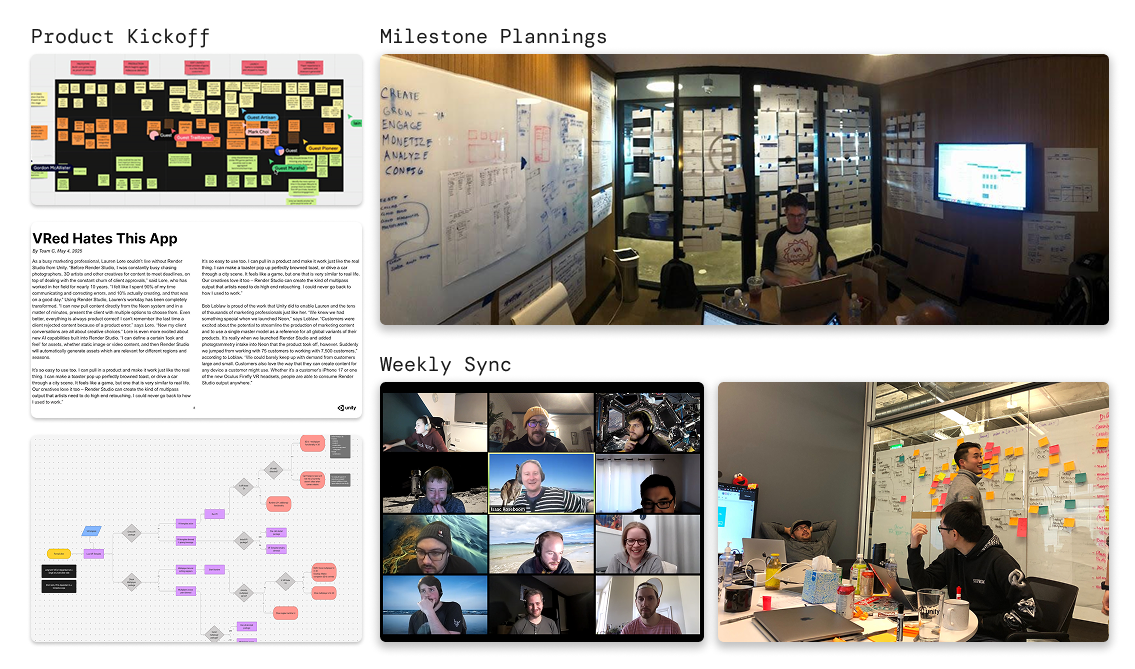
2. Stakeholder Alignment
Mapping features into Information Architecture Diagram
3. Design Ideation
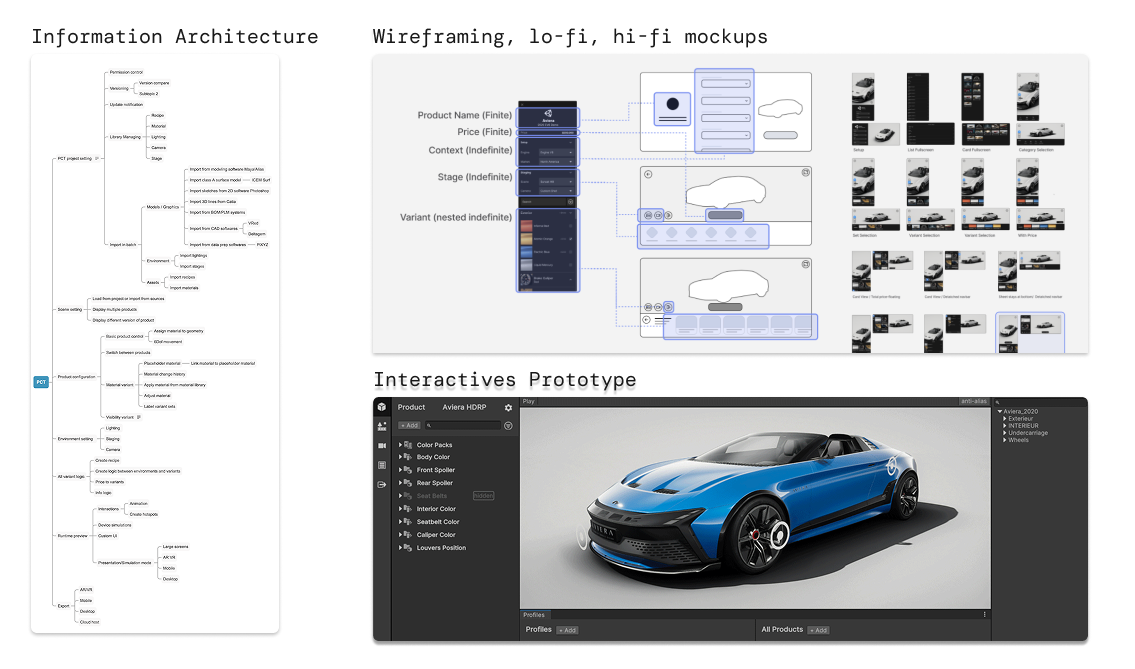
Translate requirement into features
4. Production
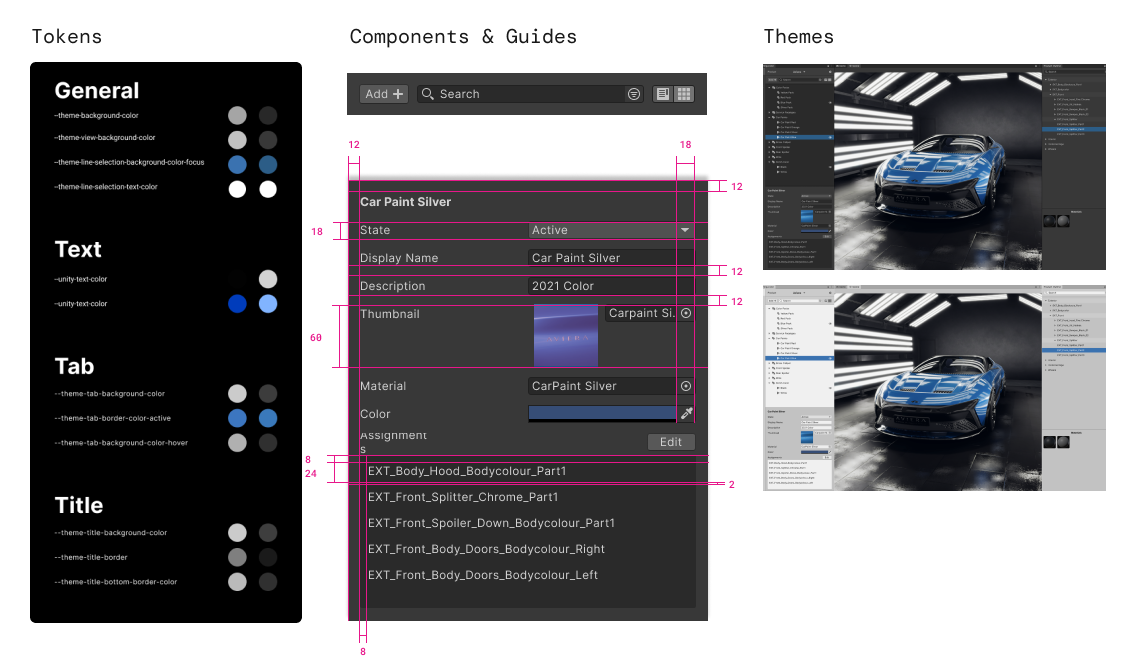
Design Process - Feature
Example Feature - Rule Engine
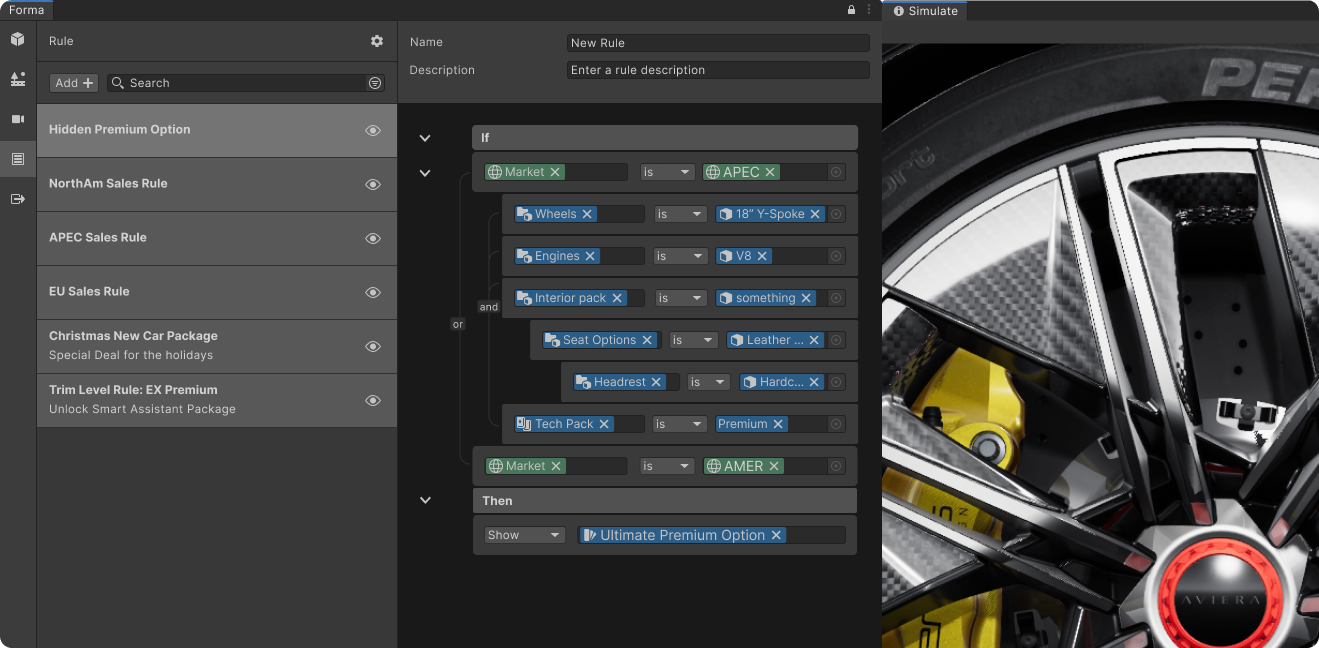
Rule Engine is created to help manufacturing managers set up rules for complex 3D product models. It handles the logic behind the scenes, so doing something like selecting a specific region automatically unlocks the right features and filters out unavailable options. It keeps the data completely accurate and ensures users can only configure products that can actually be built.
Selecting "New Zealand" in context automatically switches the cockpit to right-hand drive and unlocks regional paint colors or choosing the Premium trim unlocks the advanced safety tech pack.
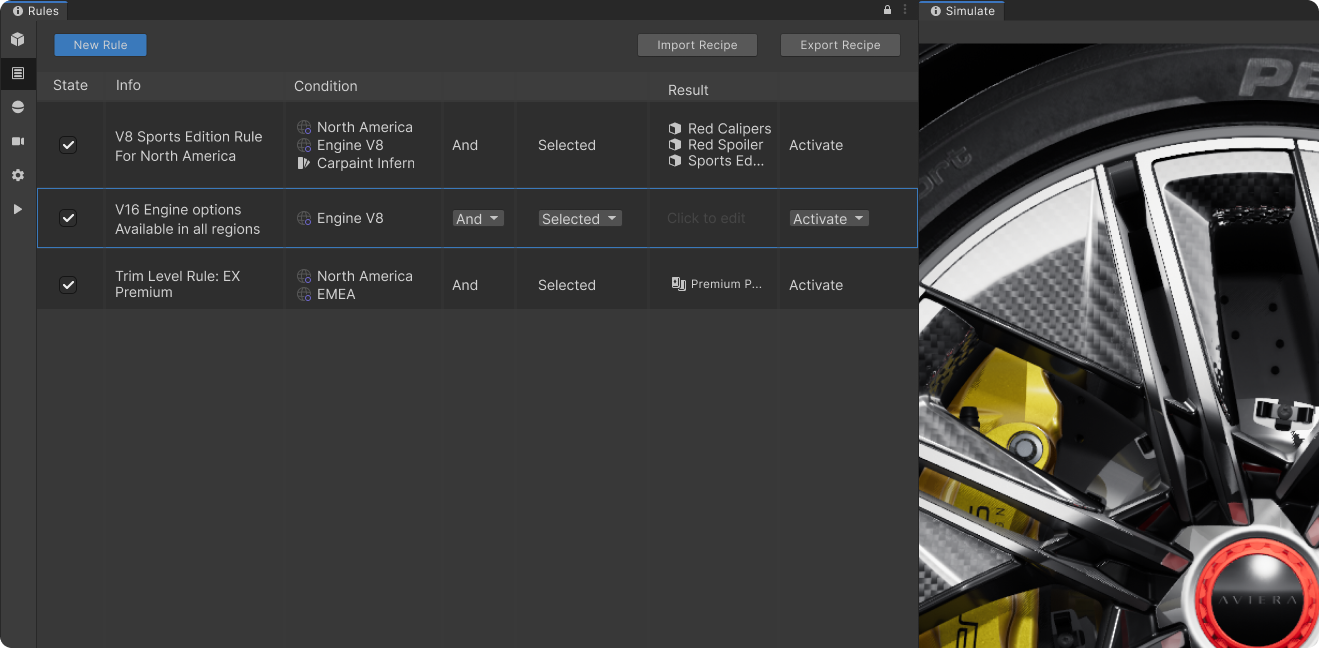
Option.1 Spreadsheets
👍 : Easy to stack and sort, great for simple rules
👎 : Difficult to create nested Rules
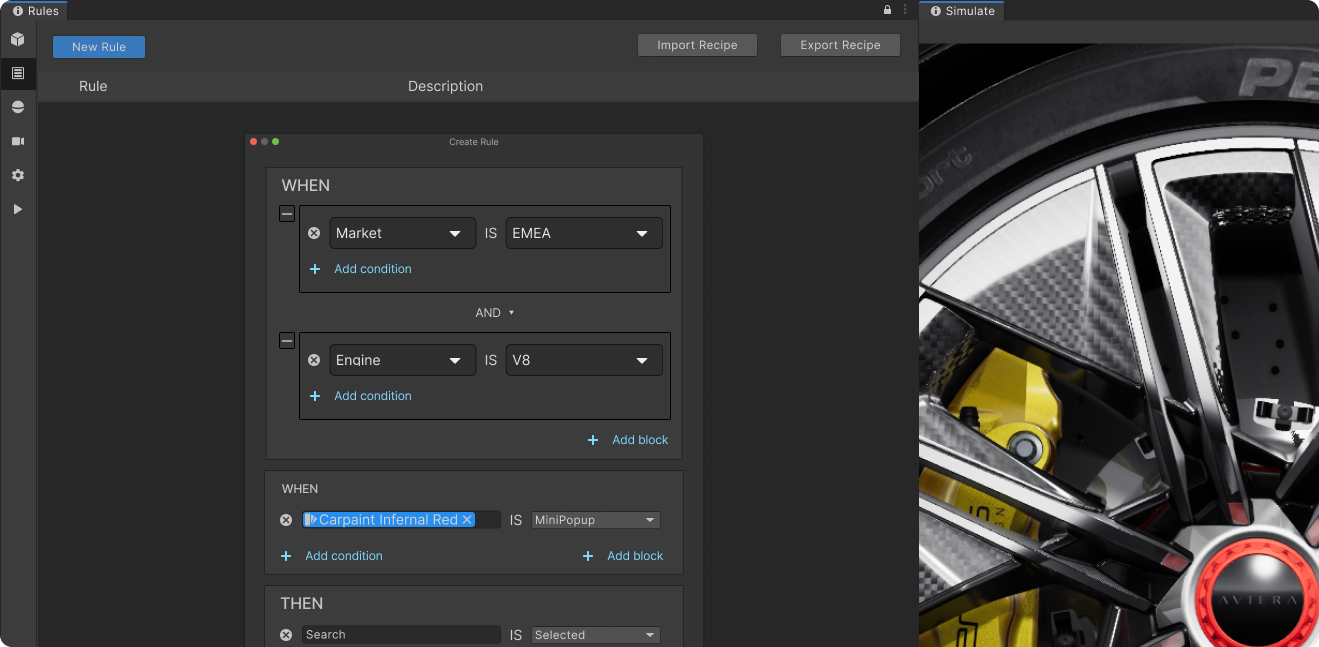
Option.2 Block
👍 : Able to create deeply nested rules
👎 : Easily get messy and chunky for a single rule set
Option.3 Hybrid
👍 : Easy to view and organize
👎 : Not yet polished
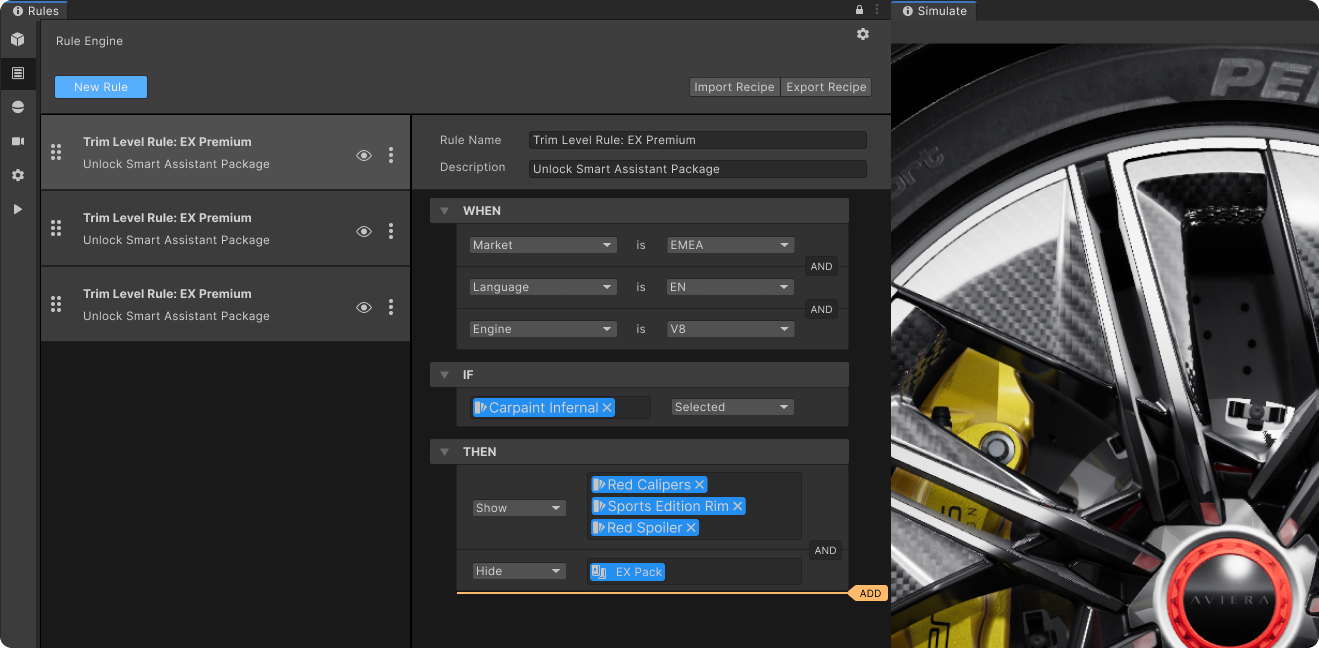
Finalized
✅ : Align with Unity Design System
✅ : Clear Connection between conditions
✅ : Designed for detail interactions and edge cases
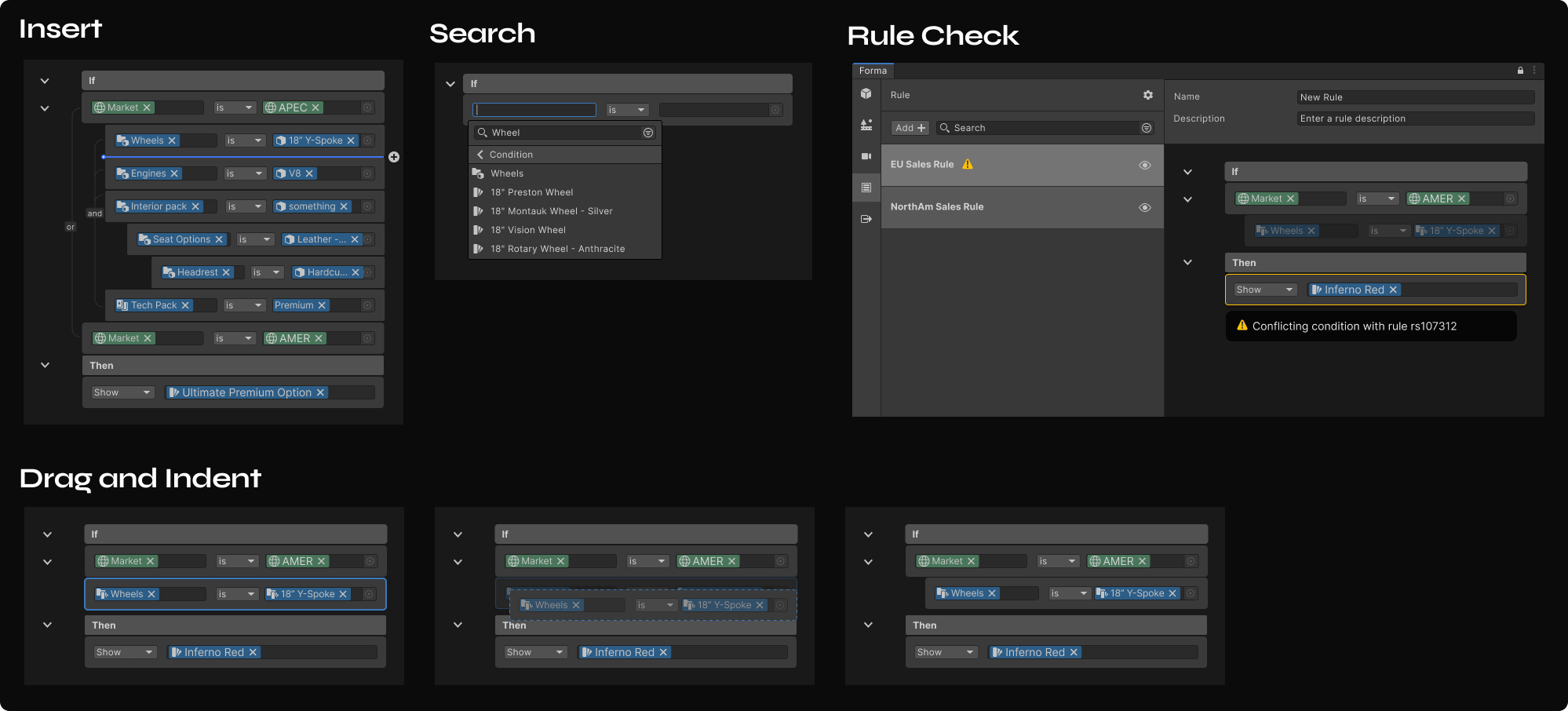
Working with Constraints
Growing Design System
Unity’s design framework handles packed UIs well, but the clutter clashed with Forma’s need for an inviting interface. I collaborated with the core design system team to ensure new use cases are addressed and also created new patterns to help grow the design system.


Forma Interface
From months to hours
Before Forma exist, it requires a teams of 3d artists and engineers months to create configurators. Now, Forma does all the heavy lifting, making a configurator is only a matter of hours.
MVP run through
Create product variations in seconds
Users could create product variations simply by dragging elements from the product outline, materials, or the object in the scene and dropping them to the variant table, there’s no need to code a single line to create product variations.

Product Tab
WYSIWYG, saving 73% communication overhead
In Forma, what you see is what you get, now teams could visualize and collaborate on the exact scene instead of talking through wireframes or long documents, saving hundred hours of communication costs across different department.

Runtime template in preview mode
Single-source of truth model management
Scaling for multiple platform became easy. Set up rendering methods, models, environment, and material for target platform all in one place. Saving companies millions on recursive spending, a true budget saver.
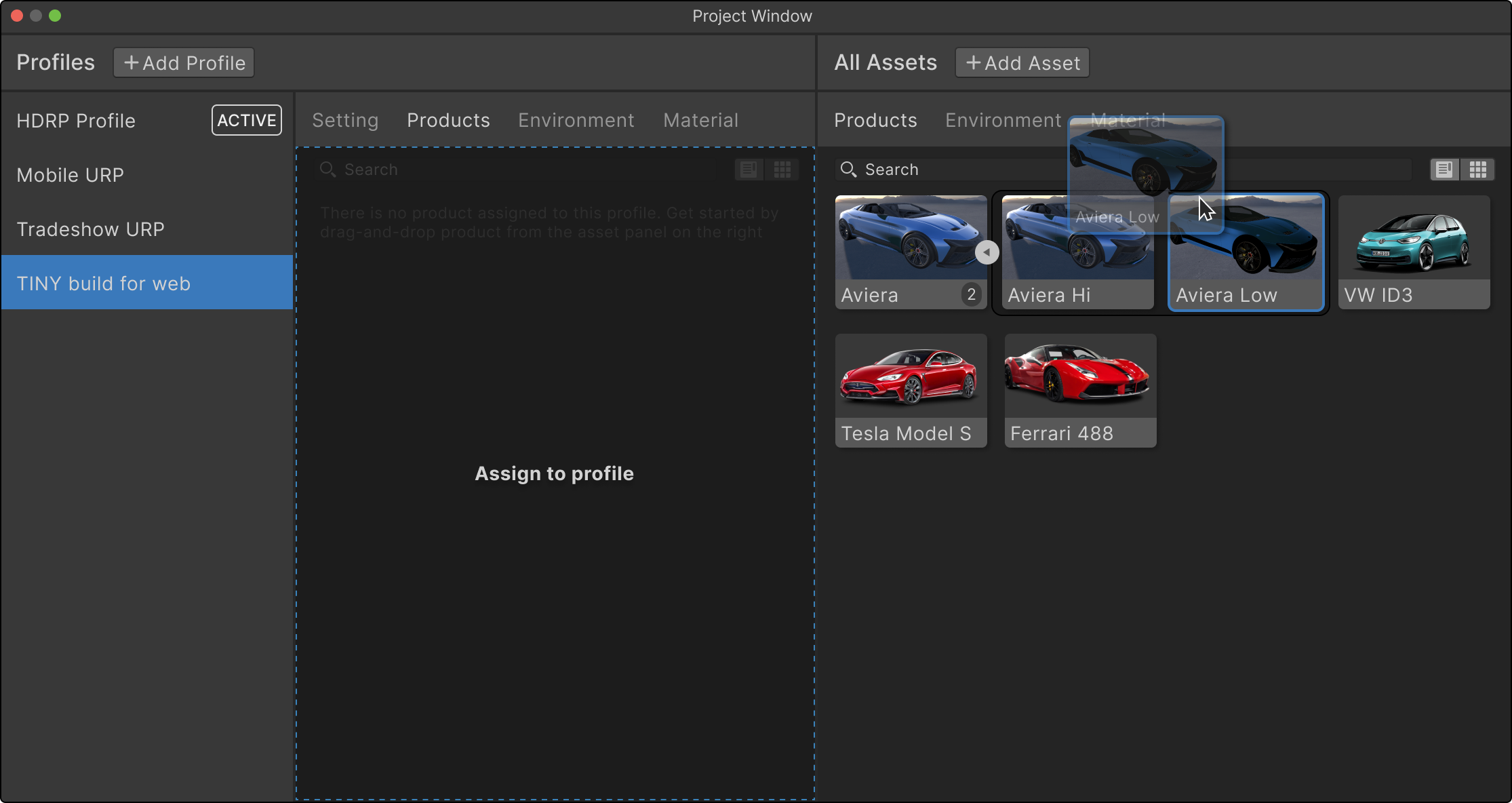
Profile window
An easy entry to virtual photography
Forma Editor provides powerful camera systems to set up interactive 3D configurator experiences.

Camera Tab
Iterate compositions on the fly
It’s 20 times faster to create compositions in RT3D, Alyx could reuse environment and fine tune look and feel to create a consistent brand identity across scene.

Environment Tab
True-to-sales rules is a few clicks away
Creating rules true to sales is easier than ever, simply import from code or use our simple UI to edit product variation. No need for compare thousands line of rule code and excel sheets on two monitors and sending screenshots and emails back and force with the engineers.

Rule Tab
An innovation of workflow
Forma saves hundreds hours in each step of the workflow. Users can create an immersive experience and export them into multi-channels all in RT3D with no code required. It is true workflow innovation that help small retailers to big companies making their transition into 3D content creation.

Export Tab
Shipping and Beyond
Volkswagen ends up being one of the first batches of early adopters of Unity Forma alongside various industry leaders including Airbus, Stellantis, Arksen and many more.

Post-launch Validation - Improved Template to Support More Device Types
Earlier Runtime UI isn’t mobile friendly enough
In the beginning, we were only targeting desktop users. Through user studies, we found there’s strong demand to build configurators for mobile devices.

Challenge
Challenge: Expanding use case in the last minute
With limited engineering power, we need a generic UI that detects device orientation and will work from a large TV screen to a small i-phone SE screen.
*** We are neither building a responsive UI nor an adaptive UI here! Neither UGUI nor UI Element provides an easy way to create responsive UI that is so common in the web/mobile world. There’s no column systems, media query, sorts of things that make engineering responsive layout easy. Therefore, to maximize the outcome with the least time
What I did first is to analyze the configurator, identify finite and indefinite elements so we know how to create a layout that consumes and displays data well. For finite elements like logo and product name, there’s always one of each in a configurator, therefore, a fixed container would work well. On the other hand, for an indefinite list like product variants which users could make as many as the PC could handle, we need to define a container with a scrollable area.
Then I moved on to wireframe the basic structural interactions. The reason I used a layout where the scene is on top and the control sheet at the bottom is based on my research on multiple automotive game UI and configurators, this layout is optimal for car presentations.


Explore scalable solution in a tight timeline
Next step, I created mockups for both landscape and portrait views.

After discussion with the PM, we think our template should serve more products besides cars, therefore, I decided to use a more squared ratio scene. Also, I iterated on several different layouts to get to a UI that needs the least conditions in code but still works well for any sort of product.

Understand engineering to create efficient designs that balanced flexibility and usability
Below is the final layout, the difference between portrait and landscape is minimized:

The control sheet is always vertical
Using same navbar and header
Using a card list so the behavior difference only lies in the scrolling direction.
Price tag always centered at the bottom of the scene
UI toggle always stays on the top-right
I tested out the design on multiple screen-sized as follows. with the same pixels (under the premise all UI runs on default system, scaling factors) The UI works fine from small smartphone screens to desktops. To run beyond a 4K screen, in the engineering end just need to specify multiplication by 2 for the UI.

TAKEAWAY
Building empathy as a team
Building products for specialized experts is difficult. Early on, we noticed the team was making technical decisions that didn't quite fit our users' needs because they lacked the right context. To fix this, I started weekly product reviews with everyone from engineering to business. We walked through workflows and shared research findings together. This changed how our developers worked—they began actively evaluating if their code actually solved the user’s problem. Because the whole team understood the 'why' behind every feature, they became faster and were able to make smart decisions on their own.
Testimony

“Volkswagen constantly seeks new paths to delight the user when experiencing our cars. Unity Forma comes with features that will help us to provide faster and higher quality real-time content like configurable product visualization.”
— Head of Global Digital Marketing, VW

“Unity Forma has the potential to be the leading industry standard tool for product configuration. It is an easy-to-pick-up toolkit and will save time building complex configurations. We are excited to continue to use the tool!“
— Studio Manager, Texel Logic

Our clients understand the importance of integrating real-time rendering tools into their CG pipeline, and Unity Forma helps get us there quicker than any other tool in the market.
— Technology Director, Designory