

Gen AI in Render Studio
Summary
In this project page, I pull out AI assisted design process and the AI background generation feature to show case AI literacy and how it had impact my design process. For the complete product cycle, check out Render Studio.
Render Studio is a tool created for the marketing specialists in the manufacturing businesses managing complex products (e.g. A car of trims, parts, thousands of different combination that must have accurate marketing material based on regional markets). It uses factory 3D model to create accurate and high-res marketing content, all imageries created contains product configuration and 3D scene composition data that could be instantly reused and shared. It is not a tool to make general images.
Video walkthough of Render Studio
Challenge
How to use AI to generate backgrounds in Render Studio in order to create resuable Shots?
Process
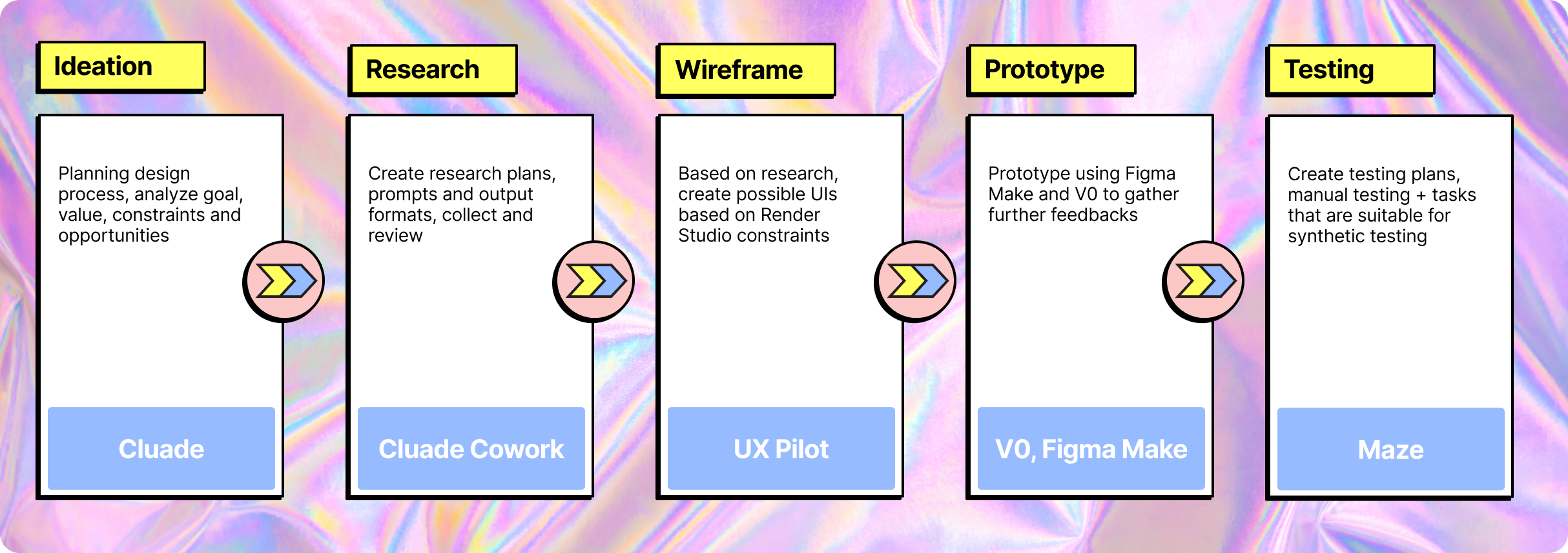
Comparative Analysis
I used Claude Cowork to rapidly audit representative 2D, 3D, and HDRI background tools, shifting my time from manual data collection to high-level analysis.
See the comparative analysis report
Create a high-level audit report of 8 products using Claude Cowork
Using Claude Cowork to create a step-to-step workflow breakdown report of Mesh.ai
Manual UI Research
I still do manual study for specific interactions and get how it feels to use the product as a human. After the overall research of existing Gen-AI tools, I made the intentional choice to strip away granular settings like model selection and output formats, as these technical levers created unnecessary friction for our specific Render Studio use case.
Manual study on high-interest interactions
Defining Background Generation Flow
After all study, I collected enough insights to define the actual workflow of using AI to generate background in Render Studio, the thought process behind is to minimize steps needed and parameter required to not overwhelm users with AI features.
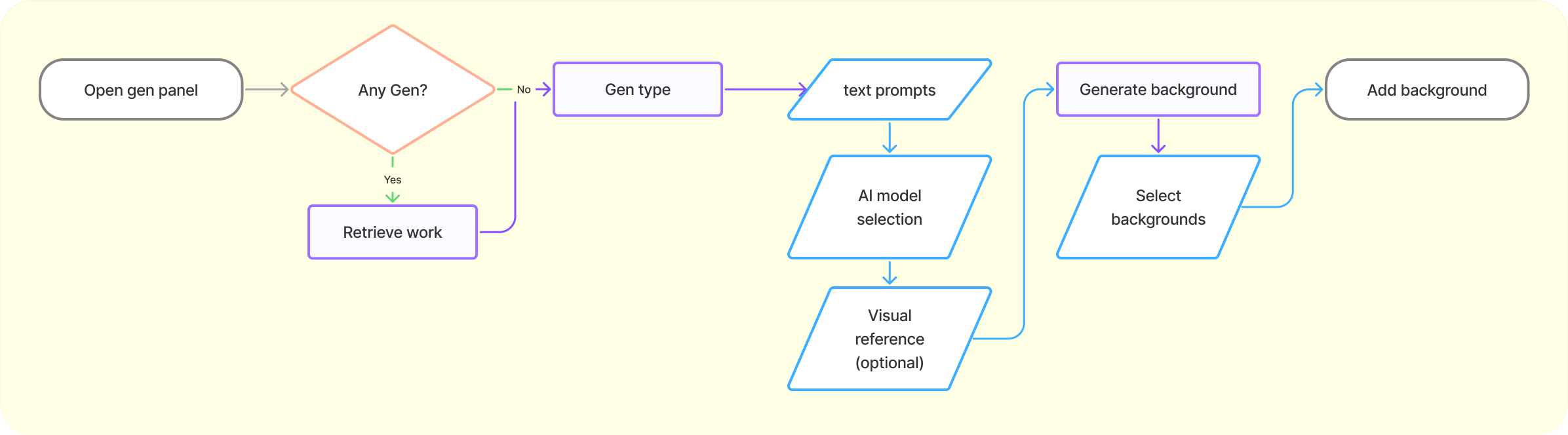
AI Assisted Prototype
With the workflow blueprints, existing Render Studio design system, and design references. I create a more comprehensive prompt that I used through the best-in-the-field AI assisted design tools (Google AI Studio, Claude Cowork, Figma Make, V0, and UX Pilot) to generate static and interactive design prototypes.

Prototype Tool Pick
From the testing using the same prompts, Claude Cowork result in the most interactable prototype and also matching the design reference mostly even though not having direct Figma connection as in UX Pilot. V0 has it’s downside of not able to easily create 3D scene like in AI Studio or Claude. Figma Make has details in UI making, but slow to iterate and wasn’t respecting the style reference even though having native Figma design integration. The most I value in prototype is about quick and cheap disposable prototypes instead of being code ready. Claude Cowork result is great from the design perspective in such case.
interactive prototype created from Claude Cowork
Design Decision
Most AI image generation tools go with the heavy UI that allows users to select model types, image format, style reference, style level, negative prompts, and many more. However, the main goal isn’t generating image as those tools, our main goal is to create a background asset (2D image, HDRI, or 3D scene) that could be composite with configurable product model, and the background generation is merely part of the workflow. Thus, I deliberately decided to not giving the AI feature the spotlight and went for the clean design which AI integrated seamlessly to existing workflow.
Final Thoughts
The interactive prototype built with Claude Cowork can’t efficiently create the exact interaction of AI-generated backgrounds yet. but it does the job of communicating the concept while I finalize the design. A few things I took away from the whole AI assisted design process:
Agentic AI is a workflow upgrade: Generative AI is great for analyzing ideas, but using agentic tools like Claude Code to map the product landscape and auto-generate shareable HTML reports is a genuine step-change and has became part of my process if needed.
Wireframing has become optional: With detailed prompts, a solid design system, and style references ready to go, I don’t find strong incentives to wireframing anymore. The time savings just aren't there like they used to be.
Faster hi-fi mockups: UX Pilot is my go-to for quickly iterate higher fidelity mockups. Because it plugs directly into Figma and respects my design system, the output is actually usable and far better than raw prompts or generic sketch-to-visual tools.
Interactive demos without the code: For interactive prototypes, I found Google AI Studio or Claude Cowork having the best result. These are perfect for getting a prototype to 80% fidelity quickly. They might not be "production-ready," but easy to tell story with and get stakeholders on board. V0 and Figma Make lack the ability to create 3D viewport.
The bigger picture: AI is currently great for linear mobile apps flows and small desktop modules. But for complex system, I use these tools for disposable prototypes to test specific interaction before manually create more accurate designs, with AI tools in video creation, visualizing product ideas have became easier than ever.
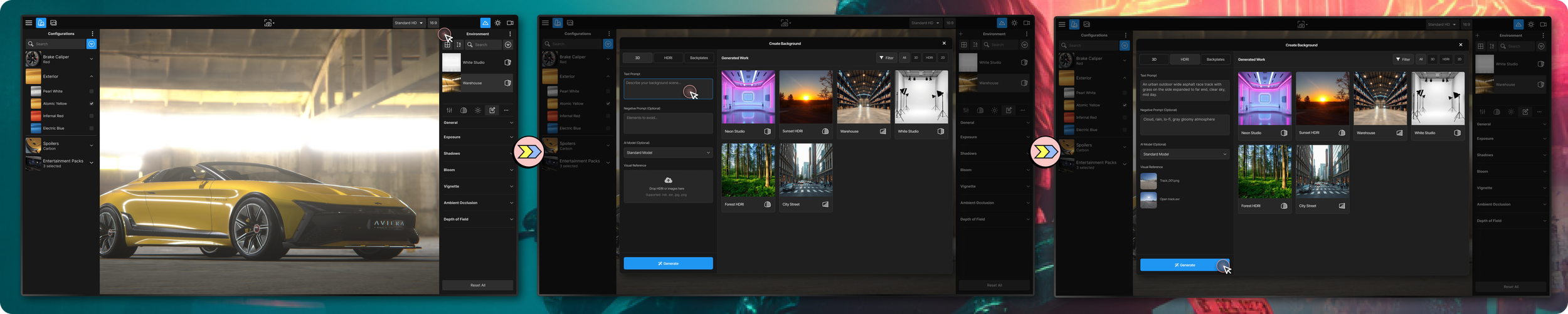
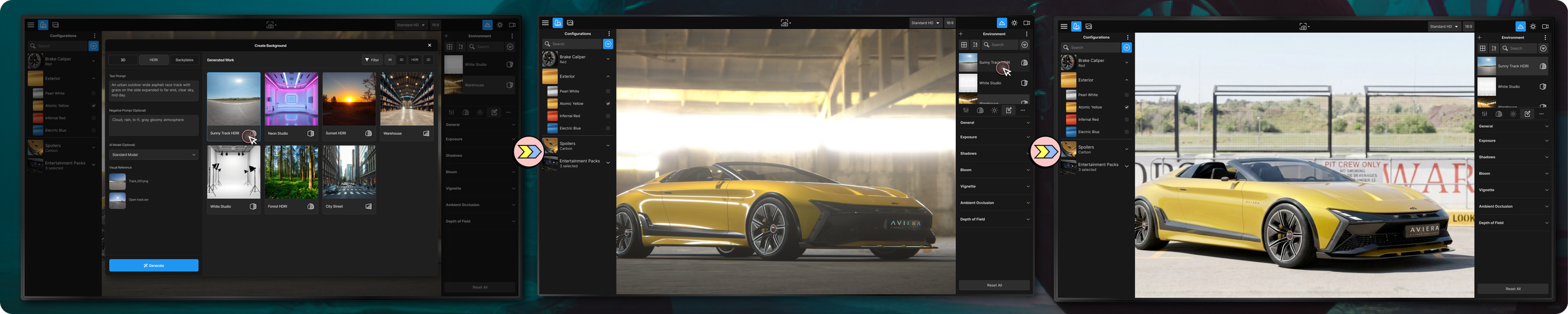
The finalized design of AI background generating in Render Studio
More To Explore
There are still a few things that I personally would like to explore more:
Indeterminate Indicators: The processing time of 3D asset and the higher quality HDRI would requires wait time that we need the transition state to reduce user cognitive load.
Preview generated background: Previewing the asset should be something that doesn’t add an additional layer and also not to interfere with the main 3D scene. It should be able to done when the background is generating.
Fine tuning background with AI: I personally do not think the current standard of having area selection of image would be a good way to fix HDRI or 3D assets, it is only doable to 2D image backplate. This would require a lot more thought and research to understand what is available yet the process should also be easy enough that doesn’t bloat the workflow.